Amazon SQS Request/Reply for Microservices
/TABLE OF CONTENTS
/ARTICLE
/ARTICLE
[1]TL;DR
- Amazon SQS has no built-in request/reply, so a service that needs an answer from another service has to add a correlation identifier and a reply queue of its own, and has to handle duplicate delivery because standard queues deliver each message at least once.
- Three SQS settings decide whether synchronous-style calls behave well: the visibility timeout (30 seconds by default, 12 hours at most), the dead-letter queue redrive policy, and the receive wait time (long polling allows up to 20 seconds).
- Message bodies are capped at 1 MiB, FIFO queues deduplicate only inside a 5-minute window, and every consumer should be idempotent regardless of queue type.
- The Graftcode Amazon SQS plugin carries a Graft call over SQS in two modes: request/reply (a per-client reply queue plus a correlation ID attribute) and one-way (no reply; the message is deleted after processing).
- The plugin ships as a single shared library, works with standard and FIFO queues, and can be tried locally against LocalStack with a ready-made Docker sample so that calls can move onto SQS without hand-written producers and consumers.
Amazon SQS is often the first managed queue that a team on AWS reaches for. It decouples producers from consumers, absorbs traffic spikes, and keeps messages until a consumer deletes them. Most of the time, the interaction is fire-and-forget: a service drops a job on a queue and moves on. The harder case comes when the caller needs the result, such as a job-orchestration service that must read a score from a scoring service before deciding what to do next. SQS offers no response channel, so every team ends up building the same plumbing for correlation, reply routing, timeouts, and retries.
This piece walks through how request/reply works on top of SQS, which queue settings decide whether it behaves well, and where duplicate delivery and message size limits bite. It then shows how the Amazon SQS plugin for Graftcode carries a typed method call over the same queues, including the configuration for both modes, the IAM permissions each side needs, and a LocalStack setup for local development. A related plugin, Azure Service Bus, handles reply routing differently, and that difference helps explain a design choice.
[2]How Request/Reply Works on Top of Amazon SQS
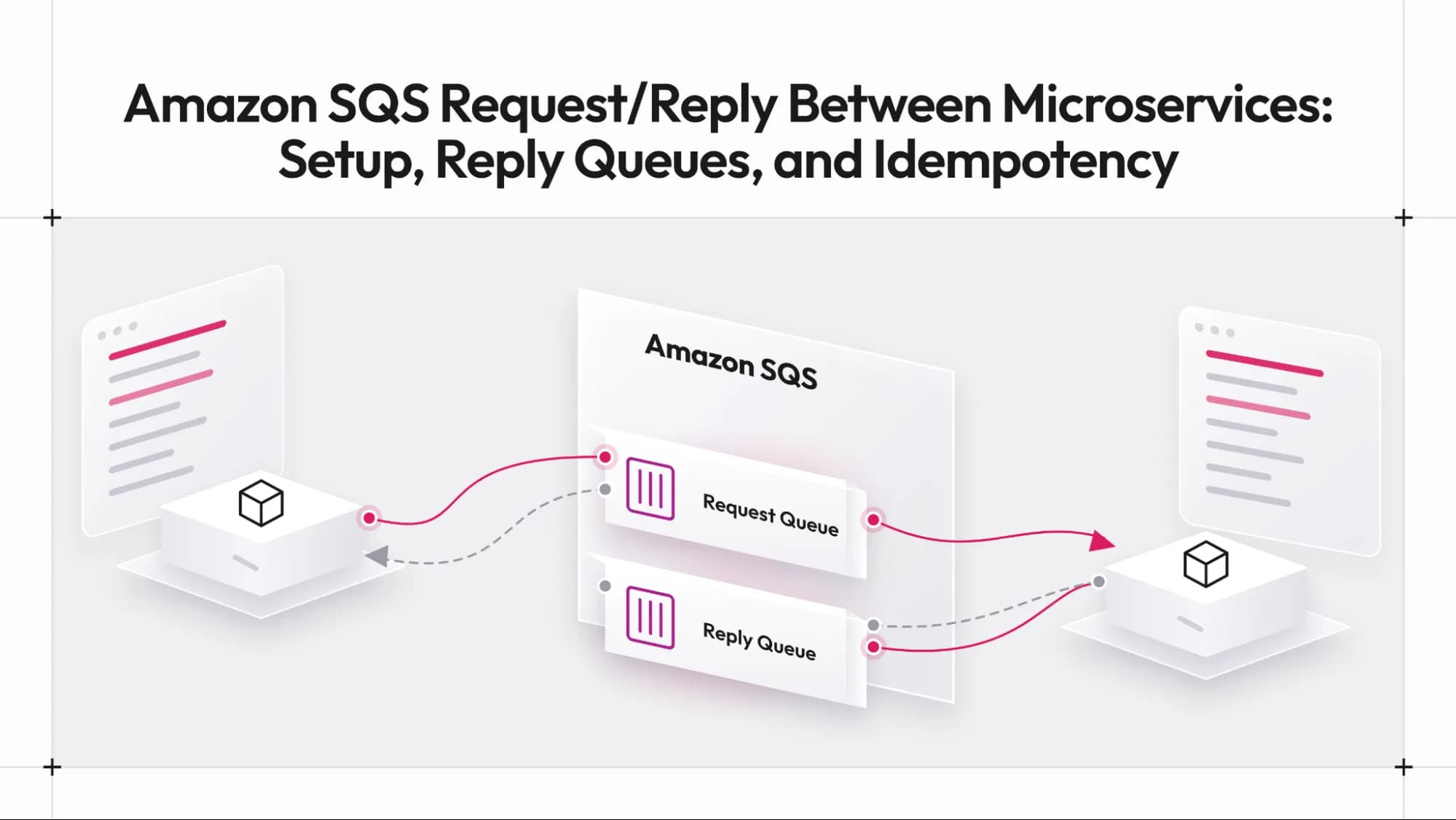
A queue is a one-directional channel. A producer sends a message, and a consumer receives and deletes it. To get an answer back, the caller needs a second channel in the opposite direction, and it needs a way to match each answer to its question. The usual pattern has three parts. The caller creates or owns a reply queue. Each request carries two pieces of metadata: a correlation ID that identifies the call and the reply queue address. The service that processes the request sends its response to that address and copies the correlation ID onto it.
On the caller's side, a receiver polls the reply queue and matches each incoming response to a waiting call by correlation ID. If no matching response arrives before a timeout, the call fails. Messages in SQS carry user-defined message attributes, which are the natural place for the correlation ID and the reply address, because they travel with the message without changing the body.
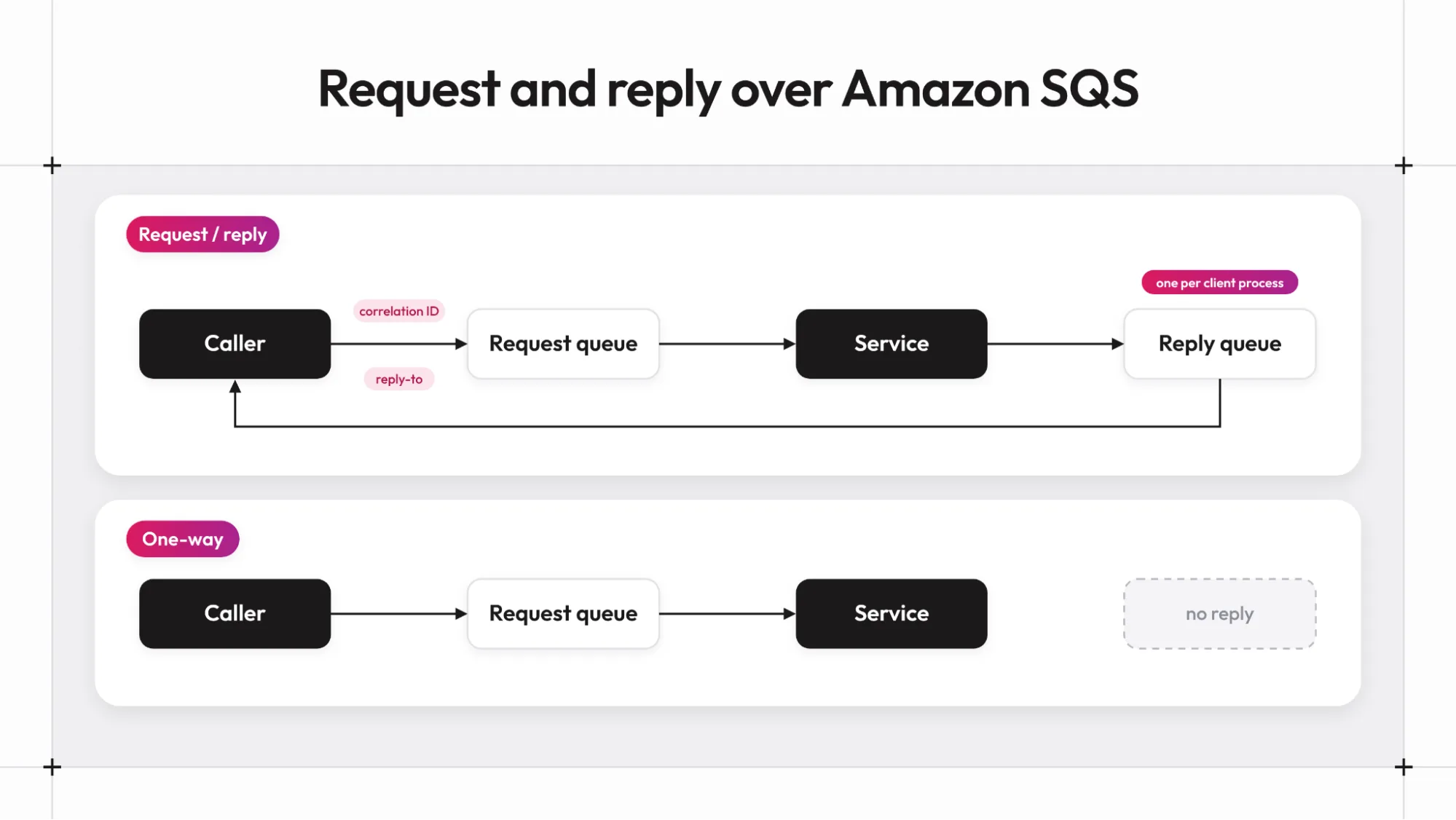
Everything else in the design follows from what SQS does and does not provide. It does not route a response to the right caller on its own. It does not guarantee a message is delivered only once on standard queues. It does not tell the sender whether processing succeeded. Each of those gaps becomes a setting or a design decision in the sections that follow.
[3]Why Each Caller Needs Its Own Reply Queue
On brokers that can filter receives by a message property, several callers can share one reply queue, and each can pick out its own responses. SQS cannot filter a receive by message attribute. A consumer that receives a message that belongs to someone else would have to put it back, and SQS has no such operation. The practical result is that each client process owns a reply queue, and no two independent processes read from the same one.
This cost is easy to underestimate. A deployment with many short-lived client processes needs a reply queue lifecycle: create the queue, give the process permission to receive from it, and remove it when the process is gone. A fixed set of long-lived services needs one reply queue per service instance, created ahead of time. Either way, the number of reply queues grows with the number of callers, not with the number of services being called.
Other brokers distribute that cost differently. Azure Service Bus, for instance, uses sessions so many clients can safely share a single session-enabled reply queue. SQS has no equivalent, so the one-queue-per-client rule applies to every SQS-based design, whether it is hand-written or generated.
[4]Delivery Guarantees, Visibility Timeouts, and Dead-Letter Queues
Standard SQS queues deliver each message at least once. According to the Amazon SQS developer guide on at-least-once delivery, a copy can occasionally be delivered again, and the guide advises designing applications to be idempotent, meaning they are not adversely affected by processing the same message more than once. For request/reply, this applies in both directions: a service may receive the same request twice, and a caller may receive the same response twice.
The visibility timeout controls how long a message stays hidden after a consumer receives it. The visibility timeout documentation gives a default of 30 seconds and a limit of 12 hours from when the message is first received. If processing finishes after the timeout expires, the message becomes visible again, and another attempt starts, even though the first one is still running. A timeout shorter than the slowest call directly causes duplicate work.
A dead-letter queue collects messages that keep failing. As described in the dead-letter queue documentation, the maxReceiveCount value in the redrive policy sets how many times a consumer can receive a message before SQS moves it to the dead-letter queue. Setting it to 1 sends a message there after a single failed attempt, so the guide recommends a value high enough to allow sensible retries. Without a dead-letter queue, a request that can never succeed returns to the queue indefinitely until it expires.
[5]Standard Queues Versus FIFO Queues for Service Calls
FIFO queues add ordering and a deduplication feature that standard queues lack. The message deduplication documentation describes a 5-minute deduplication window in which only one message with a given deduplication ID is accepted and delivered. SQS keeps tracking that ID even after the original message has been received and deleted.
Two details limit how far this protection extends. The window is five minutes, so a retry that arrives later is treated as a new message. The protection also applies to sending, not to processing: if a consumer crashes after doing the work but before deleting the message, the message is received again and processed again. For service calls, FIFO reduces duplicate sends from client-side retries, and the receiving service still needs to tolerate a repeated request.
The choice between the two types usually comes down to whether the calls being made depend on ordering within a group. Standard queues are the simpler default for independent calls. FIFO queues fit calls that must be applied in sequence for the same entity. One consequence applies to any design that uses a single message group. The message group documentation states that messages within the same group are always processed one at a time, in strict order. A queue where every message shares one group ID therefore processes requests serially no matter how many consumers are attached, and parallelism comes from using several group IDs. Both queue types need idempotent handlers.
[6]Message Size and Long Polling Limits to Plan Around
The maximum message size is 1,048,576 bytes (1 MiB), per Amazon SQS message quotas. The same page describes the SQS Extended Client Library for larger payloads, which stores the payload in Amazon S3 and sends a reference. A binary payload that is Base64-encoded before it is sent grows by roughly a third, so a body close to the limit before encoding will not fit after encoding. Large results are better returned as a reference to stored data than as a response body.
Receive behavior affects both latency and cost. With long polling, a receive request waits for a message to arrive before it returns, and the long polling documentation sets the maximum wait at 20 seconds. Long polling queries all SQS servers rather than a subset, reducing both empty responses and false empty responses, and returns messages as soon as they become available. A caller waiting on a reply queue benefits most, since a short-polling loop can miss a message that is already there.
Putting these pieces together by hand requires writing a producer, a consumer, a correlation table, timeout handling, a poller per reply queue, and the idempotency logic on both ends. The next section shows what that looks like when the call is generated from the service's public methods instead.
[7]Carrying Graft Calls Over SQS with the Graftcode Plugin
Graftcode lets one service, the Caller, call another service's public methods through a generated, strongly typed interface called a Graft. The service that exposes those methods is the Receiver, and by default a Graft connects directly to the Receiver's Graftcode Gateway. Transport plugins offer a second path, in which the Graft call travels through a broker instead. The graftcode-extensions repository lists plugins for RabbitMQ, Azure Service Bus, Kafka, Amazon SQS, and Google Cloud Pub/Sub, and the SQS plugin's README describes both a request/reply mode and a one-way mode. The Gateway runs and hosts the Receiver service, consumes requests from the queue, invokes the method, and sends the result to the reply queue named in the request.
The plugin maps directly onto the design problems described above. For correlation, each request carries a GraftcodeCorrelationId message attribute. For reply routing, it carries a GraftcodeReplyTo attribute with the caller's reply queue URL, so there is no fixed reply queue, and each client names its own. A background receiver in the client dispatches replies by correlation ID, so several calls through one transport instance can run at the same time. Binary Graft payloads are Base64-encoded into the message body with a graftcode-base64: prefix, and bodies over 1 MiB after encoding are rejected.
Delivery follows the SQS rules. The Gateway deletes a request only after processing succeeds and, for request/reply, after the reply has been sent. If something fails, the message becomes visible again after the visibility timeout. It is received again, so the README tells users to make operations idempotent and to attach a dead-letter queue. The plugin works with standard and FIFO queues. When the queue URL ends in .fifo, it sets MessageGroupId (default graftcode, configurable with messageGroupId) and MessageDeduplicationId. FIFO requests reuse the correlation ID, so an SDK retry doesn't enqueue a second request. At the same time, reply sends use a new ID so a redelivered request can still publish a response inside the deduplication window.
Failures and concurrency follow from how the Gateway side is built. In the plugin source, a request whose processing fails, or whose reply cannot be sent, is simply left on the queue, so it returns after the visibility timeout and is processed again until it succeeds or lands in the dead-letter queue. On the client side, a response whose first byte is 255 is treated as an error: the remaining bytes become the message of a thrown exception, the same convention the Azure Service Bus plugin uses. A call that never receives a reply fails once rpcTimeoutMs expires. Each Gateway instance reads one message at a time and handles requests one after another, so throughput grows by running more Gateway instances against the same request queue. The visibility timeout is not extended while a request is being processed, which is another reason to set it above the slowest call.
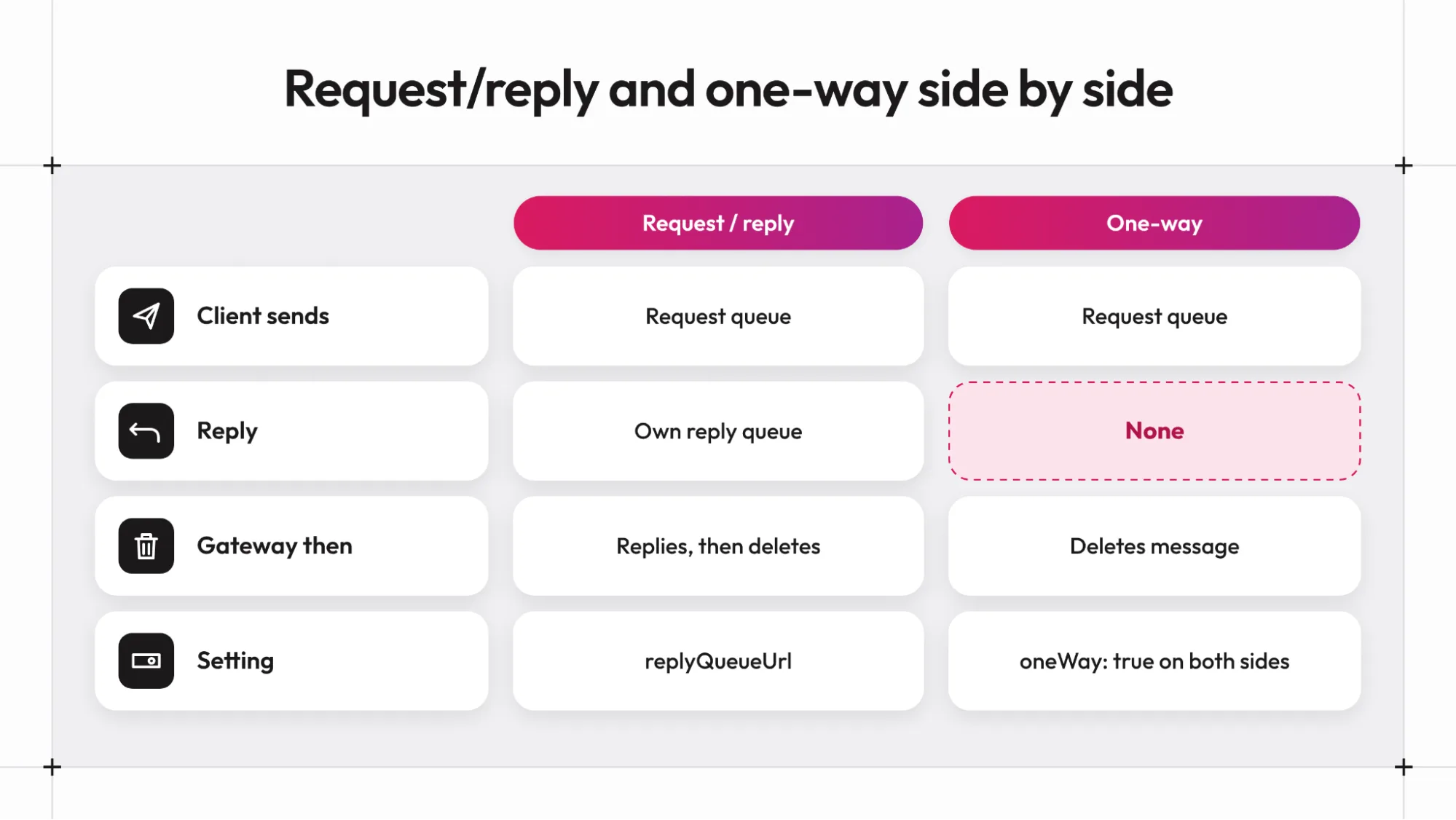
The reply queue is not created by the plugin. The client config supplies its URL, and the queue has to exist before the first call, which is why the Docker sample runs an init job that creates graft-requests and graft-replies.
Configuration for the Gateway and the Client
The Gateway side is started with the plugin config file. Install the Gateway from a terminal (on Windows, iwr https://grft.dev/get | iex; on Linux and macOS, curl -fsSL https://grft.dev/get | sh), as a Docker image, or as a binary from the Gateway releases page. The plugin library comes from the extensions releases page, and gg looks for it next to the config file first, then in its working directory. The README's Windows example runs from the folder that contains gg.exe, the hosted module (netapp.dll), and SqsPlugin.dll:
.\gg.exe netapp.dll --config sqsplugin.json
The matching sqsplugin.json in the README targets LocalStack:
{"name": "SqsPlugin","region": "us-east-1","endpointOverride": "http://localhost:4566","accessKeyId": "test","secretAccessKey": "test","requestQueueUrl": "http://sqs.us-east-1.localhost.localstack.cloud:4566/000000000000/graft-requests","waitTimeSeconds": 10,"visibilityTimeoutSeconds": 60,"verifySsl": false}
The name value is the library name without its extension, so it is SqsPlugin on Windows and libSqsPlugin on Linux and macOS. On AWS itself, the README says to omit endpointOverride, accessKeyId, secretAccessKey, and verifySsl, and the plugin then uses the AWS default credential chain. The Gateway needs only requestQueueUrl and does not need replyQueueUrl.
The client config has no runtime or host keys, because the plugin supplies the transport. Every client process needs its own replyQueueUrl:
{"configurations": {"graft.nuget.netapp": {"plugin": {"name": "SqsPlugin","region": "us-east-1","endpointOverride": "http://localhost:4566","accessKeyId": "test","secretAccessKey": "test","requestQueueUrl": "http://sqs.us-east-1.localhost.localstack.cloud:4566/000000000000/graft-requests","replyQueueUrl": "http://sqs.us-east-1.localhost.localstack.cloud:4566/000000000000/graft-replies","rpcTimeoutMs": 30000,"waitTimeSeconds": 10,"visibilityTimeoutSeconds": 60,"verifySsl": false}}}}
In C#, the README loads that config through the Hypertube SDK (Hypertube is Graftcode's runtime and protocol layer) and calls the hosted module:
using Hypertube.Netcore.Sdk;using Hypertube.Netcore.Sdk.Configuration;RuntimeBridge.AddConfig(ConfigPriority.User, configJsonOrPathToFile);var rtmCtx = RuntimeBridge.InitializeRC("graft.nuget.netapp");var result = rtmCtx.GetType("netapp.Calculator").CreateInstance().InvokeInstanceMethod("Add", 1, 2).Execute().GetValue();
AddConfig accepts a JSON string, a file path, or the name of an environment variable holding either; the key under configurations must match the name passed to InitializeRC, and only one plugin config is loaded per process.
One-Way Calls and the Settings That Tune Both Modes
For methods that do not return a value, set oneWay to true on both the client and the Gateway. The client then sends without waiting; the message carries no GraftcodeReplyTo attribute, and the Gateway deletes the message after processing. The one-way client needs only the request queue:
Four settings in the field reference map straight onto the SQS behavior covered earlier. rpcTimeoutMs (default 30000) is how long the client waits for a reply. waitTimeSeconds (default 1, range 1 to 20) is the long-poll duration. visibilityTimeoutSeconds (default 30, range 1 to 43200) is the per-receive visibility timeout, and it should be set above the longest call. messageGroupId sets the FIFO group. Raising rpcTimeoutMs for a slow method without raising the visibility timeout reproduces the duplicate-work problem from the earlier section, so the two values move together.
{"name": "SqsPlugin","region": "us-east-1","endpointOverride": "http://localhost:4566","accessKeyId": "test","secretAccessKey": "test","requestQueueUrl": "http://sqs.us-east-1.localhost.localstack.cloud:4566/000000000000/graft-requests","oneWay": true,"verifySsl": false}
[8]**Local Development with LocalStack and the Sample Setup**
The README's local setup uses LocalStack. From the sqs folder in the plugin sources, docker compose up -d starts LocalStack and creates the graft-requests and graft-replies queues. If the init hook did not run, the queues can be created with the AWS CLI by pointing --endpoint-url at http://localhost:4566.
One detail catches many first attempts: queue URLs in the config must be the URLs the broker returns, such as http://sqs.us-east-1.localhost.localstack.cloud:4566/000000000000/graft-requests, and not http://localhost:4566/.... The SDK endpoint, endpointOverride, stays http://localhost:4566 and is configured separately. An http:// prefix on endpointOverride selects plain HTTP, which is why the LocalStack examples also set verifySsl to false. A second pitfall is message size: some LocalStack versions and older queues still enforce 256 KiB rather than 1 MiB, so a large payload that fits on a current AWS queue can be rejected locally.
The repository also carries ready-made Docker samples. According to the samples README, the SQS sample publishes LocalStack on port 4566 and the Gateway on port 10304, with Graft Vision on port 10404. Running .\run.ps1 in the sample folder builds the images, and the first run downloads the latest Linux Gateway and the matching plugin release. For manual setups, use a plugin and a Gateway of matching versions, because plugin v1.2.0 introduced a new transport C ABI, so a plugin and a Gateway from different generations may not load together. Only the first of three Gateway servers publishes ports to the host. The other two are internal consumers that compete for the same queue, which shows how additional Gateway instances share the request load. The sqs-init service is a one-shot job that creates the queues and should end in Exited (0).
[9]Permissions and Production Settings Checklist for AWS
A working local setup uses static test credentials, and none of that carries over to AWS. The README lists the permissions for each identity. The Gateway needs sqs:ReceiveMessage, sqs:DeleteMessage, and sqs:SendMessage on the request queue, plus sqs:SendMessage on reply queues. A client needs sqs:SendMessage on the request queue, plus sqs:ReceiveMessage and sqs:DeleteMessage on its own reply queue. Static test credentials belong to LocalStack only, and on AWS the default credential chain supplies identities.
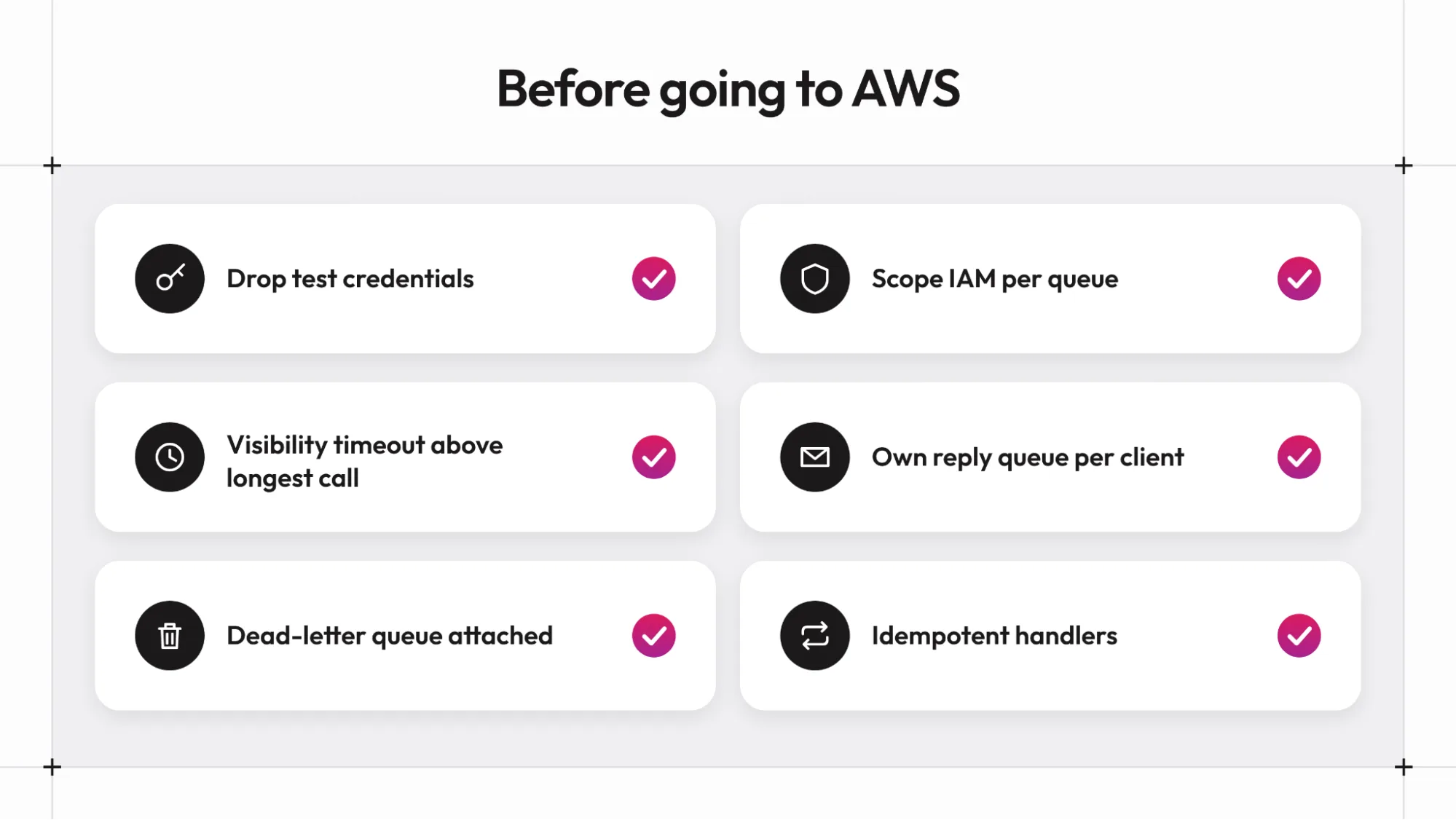
The remaining items come from the earlier sections. The queue URLs should be the ones AWS returns. The visibility timeout should exceed the longest call. A dead-letter queue should be attached with a maxReceiveCount that allows enough retries. Each client process should have its own reply queue, and the handlers behind every exposed method should tolerate being called twice.
[10]Where Should You Start with SQS and Graftcode
SQS gives a team on AWS durable queues with very little to operate, and request/reply over SQS comes down to a handful of decisions: a correlation ID and a reply address on each request, one reply queue per client process, a visibility timeout longer than the slowest call, a dead-letter queue for requests that never succeed, and idempotent handlers because delivery is at least once. The 1 MiB message limit and the 5-minute FIFO deduplication window set the outer edges of what a single call can carry and what duplicate protection to expect.
The Graftcode plugin applies those decisions through configuration instead of hand-written queue code. A good first step is the LocalStack sample in the graftcode-extensions repository: run one Gateway and one client in request/reply mode, then switch one method to oneWay and compare the behavior. The Graftcode website has the product overview and links to the documentation for the Gateway and Grafts.
[11]FAQ
Is there an Amazon SNS plugin for Graftcode?
No. The graftcode-extensions repository lists plugins for RabbitMQ, Azure Service Bus, Kafka, Amazon SQS, and Google Cloud Pub/Sub, and the SQS plugin's README states that Amazon SNS is not involved. SNS can still sit in front of an SQS queue on the AWS side, because SNS can deliver a copy of each published message to every subscribed SQS queue. The plugin itself does not unwrap SNS envelopes. It decodes each message body as its own graftcode-base64: payload and reads Graftcode message attributes, so a message that arrives wrapped by an SNS subscription is not something the Gateway can process as a call.
Does the plugin require a FIFO queue?
No. The README states that both standard and FIFO queues are supported. A queue URL ending in .fifo makes the plugin send MessageGroupId (default graftcode) and MessageDeduplicationId with each message. Either queue type needs idempotent handlers, since a consumer that fails after doing the work still sees the message again. With the default group ID, all requests on a FIFO queue share one group and are processed one at a time, so throughput-sensitive services should use a standard queue or set messageGroupId deliberately.
Can several client processes share one reply queue?
No. SQS cannot filter receives by message attribute, so each client process needs its own replyQueueUrl, and independent processes must not share one. A single process can run many concurrent calls, because a background receiver dispatches replies by correlation ID.
What happens if a call takes longer than the visibility timeout?
The message becomes visible again and is received for another attempt, which can cause the same request to be processed twice. Set visibilityTimeoutSeconds above the longest call, and raise it together with rpcTimeoutMs when a method needs more time. The value can range from 1 to 43200 seconds in the plugin, which lines up with the 12-hour limit that SQS applies.
/WRITTEN BY