MCP Server vs API: Do You Need a Separate MCP Server?
/TABLE OF CONTENTS
/ARTICLE
/ARTICLE
[1]TL;DR
An API lets your code call a service. An MCP server lets an AI application discover that service's tools and call them through one standard protocol, JSON-RPC 2.0. If you already own and host the service, you usually don't need to hand-write a separate MCP server.
- Anthropic introduced the Model Context Protocol in November 2024 specifically to solve the M×N integration problem, where every AI application previously needed its own custom connector for every data source it wanted to reach.
- The protocol runs on a client-server architecture over JSON-RPC 2.0, where a server exposes tools, resources, and prompts, and an AI application's MCP client discovers and calls them through a standard schema.
- Writing a standalone MCP server from scratch means defining a JSON Schema for every tool, implementing the transport layer, wiring up OAuth for remote access, and keeping it all in sync as the underlying service changes.
- Adoption has moved fast since the original release: OpenAI added MCP support in March 2025 and Google DeepMind followed in April, which is part of why teams now reach for a new MCP server project by default whenever a service needs to be agent-accessible.
- For a service a team already owns and hosts, most of that work is redundant, and it's the specific gap Graftcode closes by turning an already-hosted service into an MCP server automatically, with no separate project to write or maintain.
[2]MCP server vs API: the differences in one table
| API | MCP server | |
|---|---|---|
| Who calls it | Code a developer writes | An AI application, through its MCP client |
| How capabilities are found | Developers read docs or an OpenAPI spec | The client calls tools/list at runtime |
| Contract | Endpoints, often described in OpenAPI | Tools, each with a JSON Schema inputSchema |
| Protocol | Usually REST over HTTP | JSON-RPC 2.0, over stdio locally or Streamable HTTP remotely |
| Who picks the next call | Your code | The model, based on the user's request |
| Best for | Fixed service-to-service calls | Letting an agent choose among a service's methods |
A service hosted on the Graftcode Gateway gets both: its methods stay callable as before and also appear as MCP tools at http://<service-host>:81/mcp.
Every AI coding assistant, agent framework, and IDE integration released over the past two years has needed the same thing: a reliable way to reach outside its own context window and call real tools against real systems. Before the Model Context Protocol existed, that meant a custom integration for every pairing of AI application and data source, a combinatorial problem that got worse with every new tool an agent needed and every new client that wanted to use it. MCP standardized that connection into a single protocol, and it's now the default way an AI application discovers what a service can do and calls it.
This piece looks at what actually goes into standing up an MCP server by hand, since "build an MCP server" has become the reflexive answer whenever a service needs to be reachable by an AI agent, whether or not that's the right amount of work for what's actually needed. It covers the genuine cases where a hand-written server earns its place, the more common case where it solves a problem that already has an answer, and the case where a service that's already hosted and running can skip the standalone server project entirely.
[3]What an MCP server adds on top of an API
MCP follows a client-server model with three participants: an MCP host, the AI application itself, such as an IDE or a chat client; an MCP client, which the host creates one of per server it connects to; and the MCP server, the program that actually provides the context or the capability being requested. The protocol's data layer runs on JSON-RPC 2.0, and a server can expose three kinds of primitives to a connected client: tools, which are executable functions an AI application can invoke; resources, which are data sources that provide context without being executed; and prompts, which are reusable interaction templates.
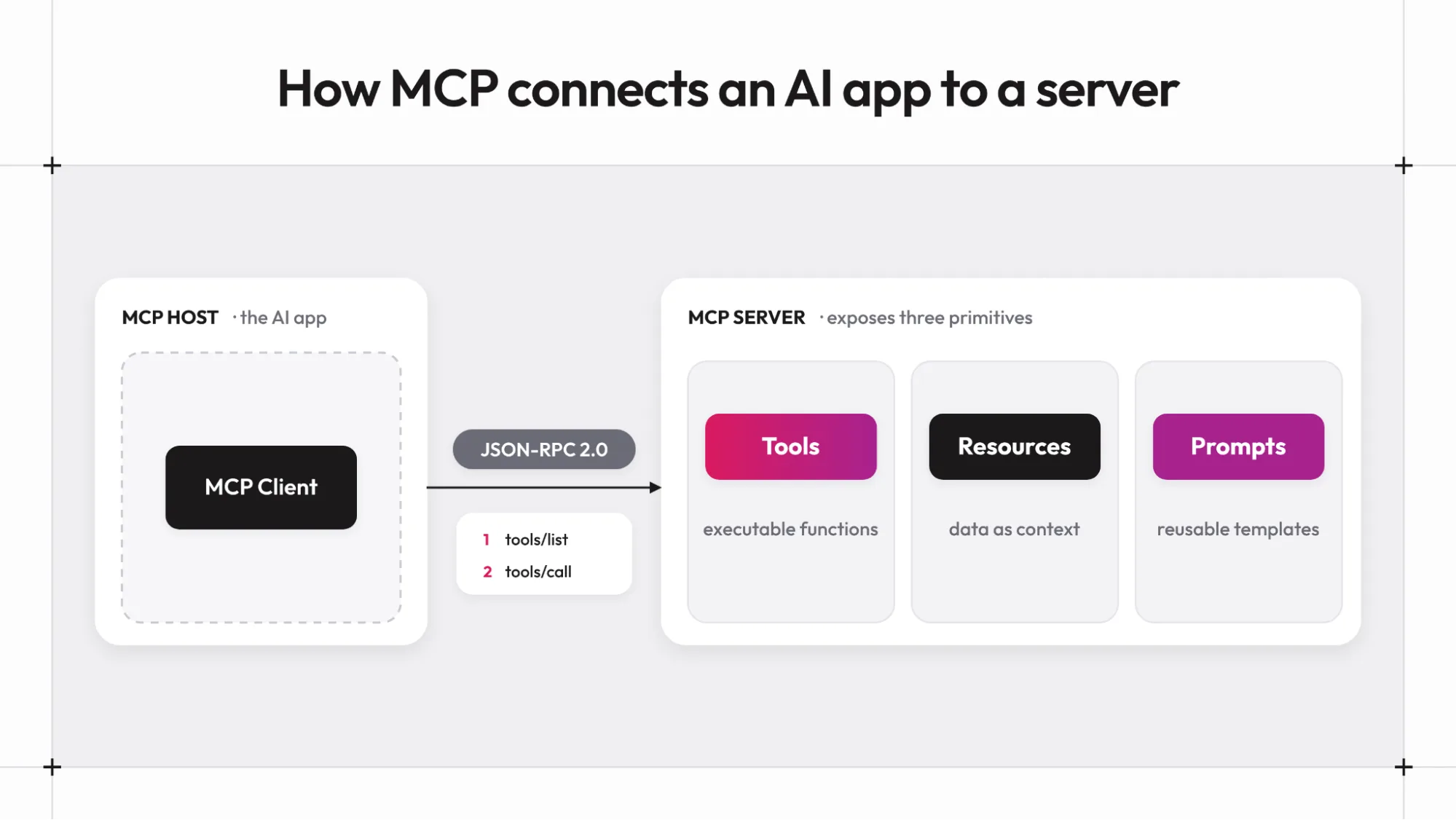
A client discovers what a server offers by calling list methods, tools/list, for example, before calling anything. Each tool in that list carries a name, a description, and an inputSchema written as JSON Schema, which is what lets an AI application know exactly what arguments a tool expects before it ever calls it. This schema-first discovery step is the part of MCP that a hand-written server has to construct and keep current by hand.
[4]Why Teams Default to Writing a Standalone MCP Server
The common pattern looks the same across most teams adopting MCP: pick an existing service or API, start a new repository, and write a server that wraps it, one tool definition per method or endpoint the AI application should be able to reach. This isn't an unreasonable first instinct. MCP arrived as a genuinely new protocol, and a dedicated server was the only way to speak it before any framework built automatic exposure on top of an existing service.
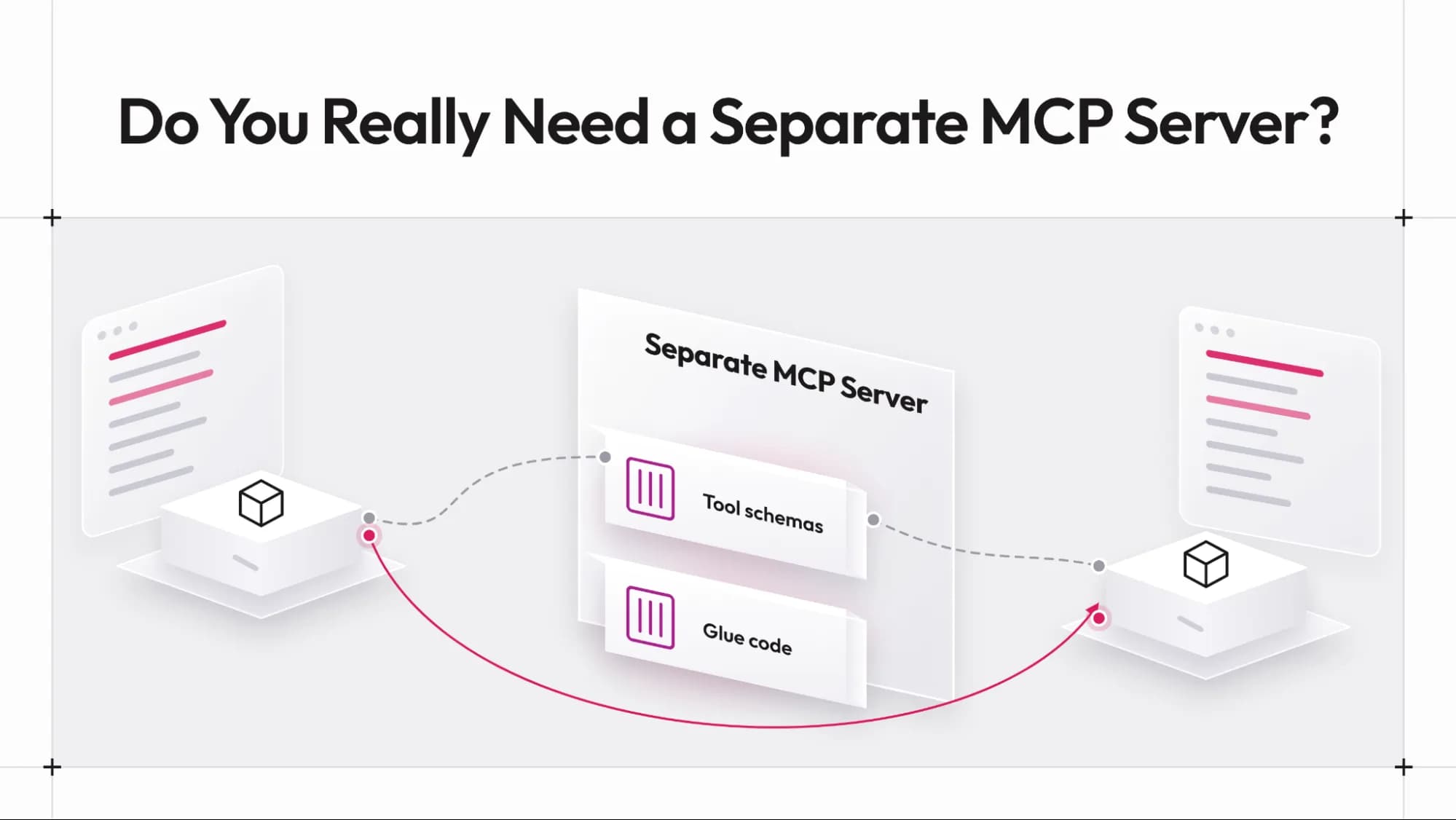
The problem is that this default gets applied uniformly, even to services a team already owns, already runs, and already exposes through some other interface. A service with twenty public methods ends up with a second project sitting beside it, one whose entire job is re-describing those same twenty methods in MCP's schema format and keeping that description accurate as the service evolves. That's a real, ongoing engineering cost paid for a service that didn't actually need a new integration point; it needed its existing one described differently.
[5]What Building a Hand-Written MCP Server Involves
Standing up a production MCP server from scratch breaks down into a few distinct pieces of work, each of which has to be written and maintained on an ongoing basis.
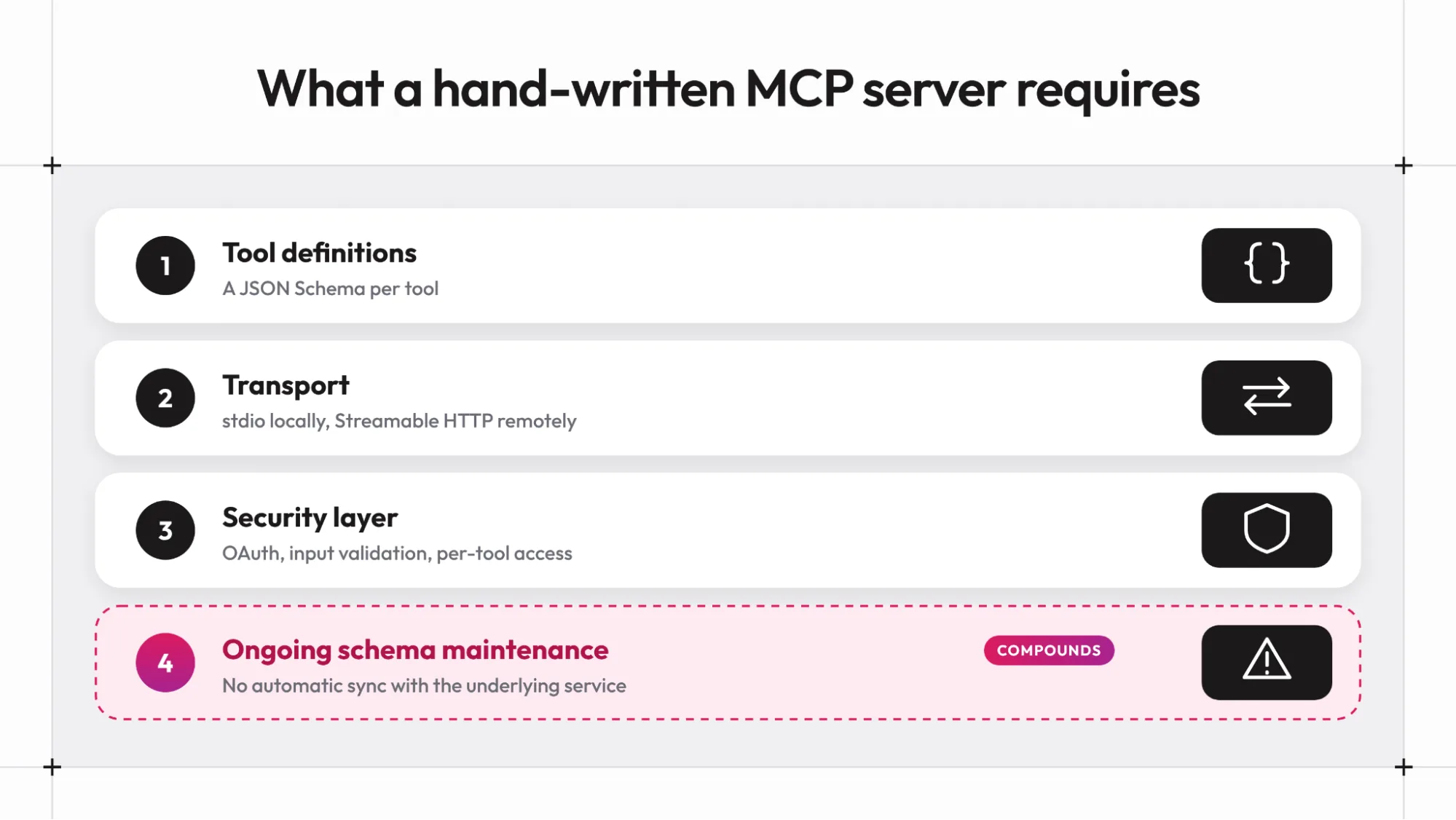
Tool definitions and schemas
Every tool needs a name, a description, and a JSON Schema describing its inputs, written either by hand or inferred from function signatures, depending on the SDK. Each tool definition is also loaded into the model's context, so it costs tokens in every session.
Transport implementation
Local development typically uses stdio, piping JSON-RPC messages through stdin and stdout, while a server meant to serve multiple remote clients needs the Streamable HTTP transport instead, a separate code path to build and test.
A security layer
Production deployments need OAuth for authentication, input validation on every tool parameter, and access controls scoped per tool, none of which come free from the protocol itself.
Ongoing schema maintenance
As the underlying service's methods change, add fields, or get deprecated, someone has to notice and update the corresponding tool definitions, since nothing keeps the two in sync automatically. That last point compounds. A REST endpoint that changes shape breaks callers loudly, with a status code or a schema validation error. A stale MCP tool definition describes a method that no longer behaves as its schema claims, and an AI agent has no way to detect that until a call fails in a way that doesn't match what it was told to expect.
[6]When a Standalone MCP Server Is Still the Right Call
None of this means a hand-written server is the wrong choice everywhere. It's the right call in a few specific situations.
Wrapping a third-party API a team doesn't control
A service like a payments provider or an issue tracker is run by someone else, so a team has no hosting layer of its own to hook into, and exposing it to an agent means writing a server that translates its existing API into MCP's schema, the same way the official reference servers for services like Sentry work today.
Serving a deliberately curated tool surface
Sometimes an agent should see three narrow, purpose-built actions instead of the twenty raw methods a service actually has, and that curation is a real design decision a standalone server can express directly.
Exposing resources or prompts with no matching method
A server built to hand an agent a document, a schema, or a prompt template is doing something a service's public methods were never meant to provide in the first place.
Each of these has one thing in common: the MCP server is doing genuine translation or curation work, not just re-describing methods a service already exposes somewhere else.
[7]When to use an MCP server vs an API
A standalone MCP server is worth writing when:
- The system being wrapped is a third-party API with no internal hosting layer to hook into
- The tool surface an agent should see needs to be meaningfully narrower or reshaped from the service's actual methods
- The server needs to expose resources or prompts that aren't just wrappers around existing method calls
It's very likely redundant when:
- The service is already internally owned, hosted, and running
- The tools an agent needs map one-to-one with methods the service already exposes
- The main work left is writing and maintaining schema definitions that just restate what the service already does
The test that cuts through most of this: if the answer to "what would this MCP server actually do" is "call our own service and format the response," that's translation work a team is writing by hand for a service it already controls end to end.
[8]How Graftcode Turns a Hosted Service Into an MCP Server Automatically
For the redundant case above, a service already hosted through the Graftcode Gateway doesn't need a separate MCP server project at all. Every service the Gateway hosts becomes an MCP endpoint automatically once it's running, with public methods exposed as MCP tools with no annotations or separate schema file to write, and developers can narrow what is exposed with access policies when they need tighter control.
# Hosting a service through the Gateway also exposes it over MCP, no extra setupgg PhysicsCalculator.dll --modules ./modules
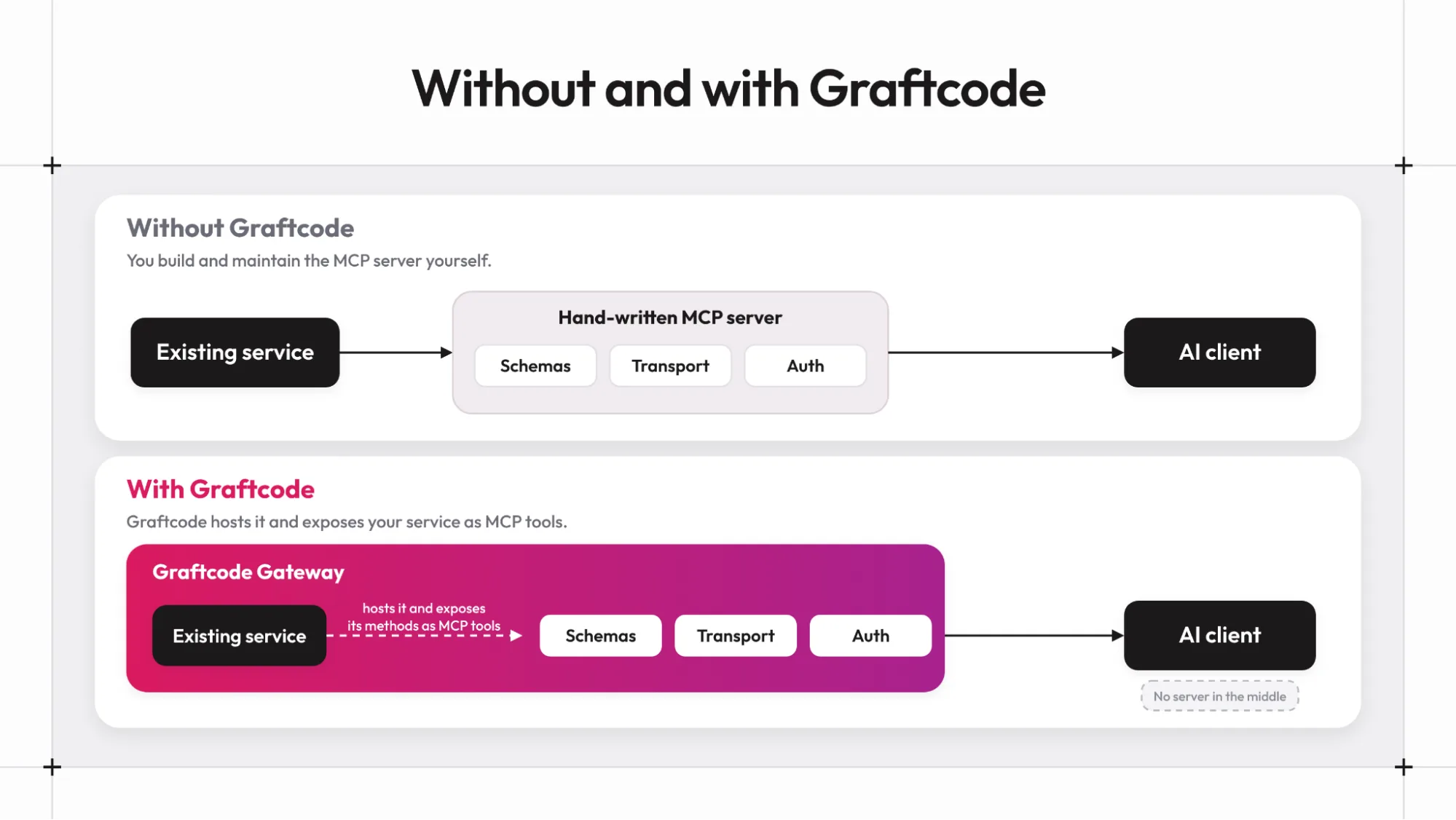
Once that's running, any MCP-compatible client, Cursor, Claude, Windsurf, Roo Code, Continue, GitHub Copilot, and Zed, among them, can connect directly:
http://<service-host>:81/mcp
That's the same port 81 that serves Graftcode Vision, the live method documentation for that service. Access control works the same way here as it does for any other caller: a method a team hasn't exposed through the Gateway's access policies doesn't exist as far as a connected agent is concerned, so the same narrowing a team already applies to regular callers applies automatically to MCP tool visibility too. This is confirmed across JavaScript, Python, Ruby, PHP, Java, C#, Groovy, and Kotlin.
This doesn't replace an existing REST or gRPC API a service already has; those can keep running exactly as they are. What it removes is the separate MCP server project a team would otherwise write purely to give an AI agent access to a service that's already hosted and already exposing its methods to everything else.
See how to take an MCP endpoint to production.
[9]What Still Needs Custom MCP Work Even With Graftcode
Automatic exposure only covers services actually hosted through a Graftcode Gateway. A third-party API a team doesn't run itself still needs a hand-written server to translate it into MCP, since there's no Gateway to point at something Graftcode doesn't host. The same goes for a deliberately curated or reshaped tool surface, narrower than what a service's raw methods expose, or resources and prompts that don't correspond to any method call at all. Access policies can narrow which methods are visible, but they narrow from what the service already has, they don't invent a different surface from scratch.
For everything else, the pattern holds: a service that's already internally hosted doesn't need a second project whose only job is describing it again in a different schema.
[10]Where to start: test one hosted service first
Standing up an MCP server is real, necessary work when a service genuinely needs translation, whether that's wrapping a third-party API, curating a narrower tool surface, or exposing resources that don't map to any existing method. It's redundant work when the service is already internally owned and hosted, and the MCP server being written would do nothing but restate methods that already exist somewhere else in the system.
Before starting a new MCP server project, check whether the service in question is already hosted somewhere a team controls. If it is, that's the case worth testing against automatic exposure first. Explore Graftcode to see how MCP support works for a service you already host, or go straight to the Graftcode MCP Quick Start for the full setup reference.
[11]FAQs
1. What's the actual difference between an MCP server and a regular REST API?
An MCP server speaks a specific protocol, JSON-RPC 2.0 with a standardized discovery and schema format, designed for AI applications to discover and call tools dynamically. A REST API has no such standardized discovery mechanism built in; an AI application calling one typically needs a hand-written description of its endpoints provided separately, which is exactly the gap MCP was designed to close.
2. Can one MCP server expose tools from multiple underlying services?
Yes, nothing in the protocol limits a server to wrapping a single service. Whether that's a good design choice depends on the case, a server aggregating several unrelated services tends to accumulate the same shaping and maintenance problems a general-purpose backend does, for similar reasons.
3. Do third-party APIs a team doesn't control need their own MCP server?
Generally yes. There's no way to automatically expose a system a team doesn't host or control, so reaching it through MCP means writing a server that translates its existing API into the protocol's schema format, the same approach official reference servers for third-party platforms use today.
4. Does Graftcode replace the need to ever write a hand-written MCP server?
No. Graftcode covers services a team hosts itself: once a service runs through the Graftcode Gateway, its public methods are available as MCP tools without a separate server project. It does not cover a third-party API the team does not host, such as a payments provider, because there is no Gateway to run it through. It also does not cover a deliberately different tool surface, such as three curated actions in place of twenty service methods. Both of those cases still need a hand-written MCP server.
5. Does exposing a service through Graftcode's automatic MCP support require rewriting it?
No. A service becomes an MCP endpoint by running through the Graftcode Gateway the same way it would for any other caller; its own code doesn't need to change. The same public methods already exposed to regular Graft callers are what becomes available as MCP tools once the Gateway is hosting that service.
6. Can an API be an MCP server?
Not on its own. An MCP server speaks JSON-RPC 2.0 and lists its tools with JSON Schema, which a REST API does not. An MCP server can wrap an API, and Graftcode exposes a service it already hosts as an MCP endpoint without a separate server.
7. What is the difference between an MCP host and an MCP server?
The host is the AI application, such as an IDE or chat client, and it creates one MCP client per server. The server is the program that provides tools, resources and prompts.
8. Will MCP replace APIs?
No. Most MCP servers call existing APIs underneath. MCP adds a standard way for AI applications to find and call those capabilities.
/WRITTEN BY