Google Cloud Pub/Sub Request/Reply Guide
/TABLE OF CONTENTS
/ARTICLE
/ARTICLE
[1]TL;DR
- Google Cloud Pub/Sub has no reply mechanism, and a publish is delivered to every subscription that already exists on the topic, so a service that needs an answer must add a correlation attribute, a reply topic, and a reply subscription that exists before the request is published, or the reply is lost.
- Pub/Sub offers at-least-once delivery by default, so every consumer has to be idempotent. The settings that decide how a request/reply call behaves are the acknowledgment deadline (10 to 600 seconds), the dead-letter policy (5 to 100 delivery attempts), and the subscription retention and expiration periods.
- Message data is capped at 10 MB, and the REST pull method can return an empty response while messages are waiting, so a client that pulls over REST has to poll until its reply arrives or its timeout expires.
- The Graftcode Google Cloud Pub/Sub plugin carries a Graft call over Pub/Sub in two modes: request/reply, where each call carries
correlationIdandreplyToattributes and the caller reads its own reply subscription, and one-way, whereoneWay: trueon both sides skips the reply entirely. - The plugin calls the Pub/Sub JSON REST API with libcurl and ships as a single shared library, so no Google client library is installed on the caller, and the same code path serves the local emulator and production.
Google Cloud Pub/Sub is the managed messaging service that many teams on Google Cloud use for event ingestion, fan-out to several consumers, and buffering between services. Most of that traffic is one-directional: a service publishes an event and moves on. A different case appears when a service needs the result of work done elsewhere, such as an orchestrator that waits for a scoring service to finish before it writes to a database. Pub/Sub can carry that conversation, but it does not provide the reply half, so the caller has to build it from topics, subscriptions, and message attributes.
This piece covers how request/reply is built on top of Pub/Sub, which subscription settings decide whether it behaves well, and where duplicate delivery and size limits cause trouble. It then shows how the Google Cloud Pub/Sub plugin for Graftcode carries a typed method call over those same topics, including the configuration for both modes, the IAM permissions each side needs, and a local setup with the Pub/Sub emulator. The AWS equivalent, the Amazon SQS plugin, has its own companion piece, so this one stays with Google Cloud.
[2]How Request/Reply Works on Top of Google Cloud Pub/Sub
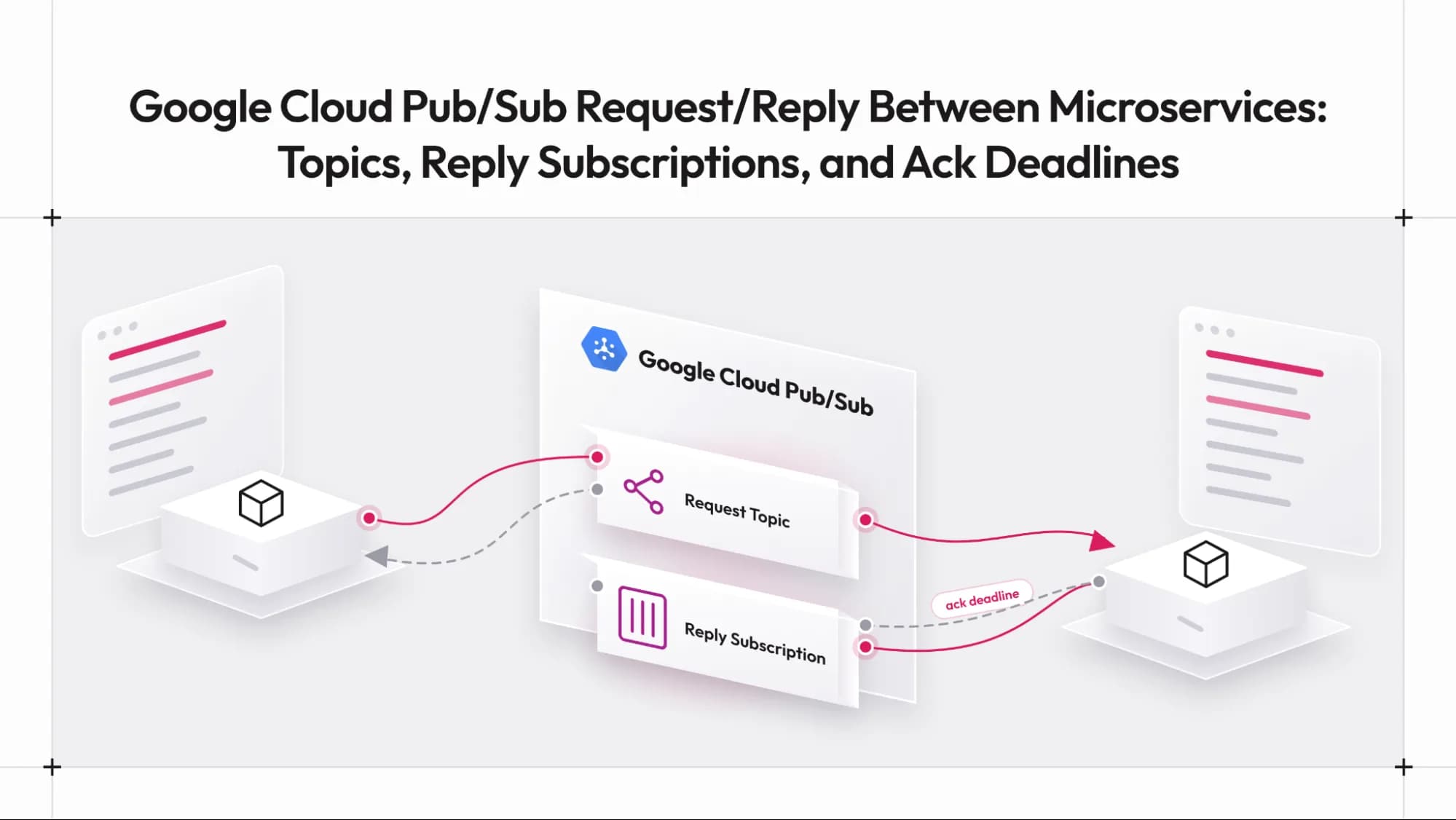
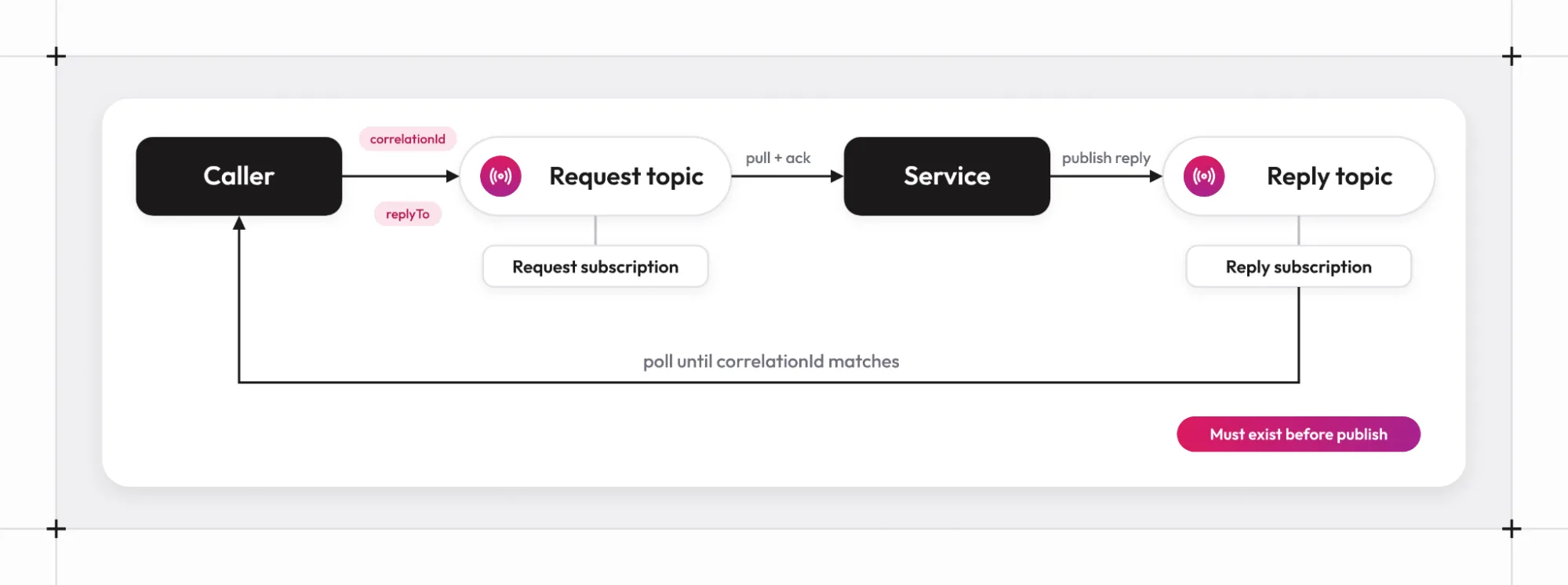
Pub/Sub separates where messages are published from where they are read. A publisher sends to a topic. A subscription is attached to that topic, and subscribers read from the subscription. One topic can have many subscriptions, and each subscription receives its own copy of every message. The plugin's Readme states the rule that governs replies: a publish to a topic is delivered to every subscription that already exists on that topic, so a subscription created after the publish never sees that message.
Request/reply therefore needs two topic-and-subscription pairs. The caller publishes the request to a request topic, and the service reads it through a request subscription. The service then publishes the response to a reply topic, and the caller reads it through a reply subscription. Each request carries a correlation identifier so that the caller can match a response to the call that produced it, and it carries the name of the reply topic so that the service knows where to send the answer. Message attributes are the natural home for both values, since they travel alongside the message without changing the body.
The ordering of setup steps is the part that is easy to get wrong. The reply subscription has to exist before the request goes out, because a response published to a reply topic with no subscription is dropped. The rest of this piece follows from that constraint and from the delivery behavior described next.
[3]Why Each Caller Needs Its Own Reply Topic and Subscription
Subscribers that read from the same subscription share its messages. Pub/Sub hands each message to one of them, not to all of them. If two caller processes shared a reply subscription, a response meant for the first caller could be delivered to the second, which would not recognize the correlation identifier and would have no way to hand the message back. Any scheme that works around this on the application side adds hand-off logic that has nothing to do with the business problem.
The simpler arrangement gives every client process a reply topic and a reply subscription of its own. The service learns the reply topic from the replyTo attribute on each request, so it needs no static list of callers and can answer a client that started a minute ago. The cost is a small number of extra Pub/Sub resources per caller process, which is a good reason to create them with deployment tooling in production instead of at runtime.
The plugin follows this arrangement. Its Readme tells users to give each client process its own reply topic and reply subscription, and not to share one reply subscription between processes. That rule shapes the configuration shown later, where the client carries replyTopic and replySubscription and the service reads the reply address from the request. Once replies have a reliable route, the next question is what happens to a request when something goes wrong in processing.
[4]Acknowledgment Deadlines, Redelivery, and Dead-Letter Topics
Pub/Sub tracks whether a subscriber has finished with a message through acknowledgment. According to the subscription overview, Pub/Sub offers at-least-once delivery by default, messages may occasionally arrive more than once or out of order, and a message can even be redelivered after an acknowledgment request returned successfully. The same page states the consequence directly: accommodating more-than-once delivery requires the subscriber to be idempotent. For a request/reply call, an idempotent method leaves the system in the same state whether it runs once or twice with the same input.
The acknowledgment deadline sets how long Pub/Sub waits before it sends an unacknowledged message again. The subscription properties page gives a default and a minimum of 10 seconds and a maximum of 600 seconds. It also lists two retry policies: retry immediately, which is the default, or retry after an exponential backoff delay with a longest backoff of 600 seconds. A deadline shorter than the slowest call produces duplicate executions of that call, which is one of the most common reasons for surprising behavior in request/reply setups.
Messages that never succeed need somewhere to go. A dead-letter topic is configured on the subscription, and the dead-letter topic documentation gives a maximum delivery attempts setting with a default and minimum of 5 and a maximum of 100. The attempt count is approximate, so a message can be forwarded after slightly fewer or more attempts than configured. Pub/Sub also needs publisher and subscriber roles granted to its service account before forwarding works. Without a dead-letter policy, a message that always fails is retried until it expires from retention.
Google also offers an exactly-once delivery option. The exactly-once delivery page limits it to pull subscriptions and to subscribers that connect in the same region, and it covers redelivery of a message, not the side effects that a handler produces. Treating the handler as idempotent remains the safer design either way. Delivery behavior is only half of the picture, because the way a client reads messages decides how quickly replies arrive.
[5]Pull Subscriptions, Polling, and Message Size Limits to Plan Around
Pub/Sub offers several ways to read from a subscription. Google's pull documentation describes StreamingPull, which keeps a long-lived bidirectional connection and is recommended for most use cases, and unary Pull, where each request gets one response. It also warns that a unary response with zero messages does not necessarily indicate that no messages are available. A client built on unary Pull, which is the shape of the REST pull method, therefore has to ask repeatedly and accept some empty answers.
Size limits shape payload design. Google's quotas page lists a 10 MB limit on message data, up to 100 attributes per message with a 256-byte limit on attribute keys and a 1,024-byte limit on attribute values, and 7 days of default retention for unacknowledged messages. It also notes that a subscription with no subscriber activity expires, with a default expiration period of 31 days. These last two settings affect services that sit idle: a reply subscription that goes unused for a month can disappear, and a request that waits longer than the retention period is dropped.
Two practical rules follow. Keep payloads well below the data limit, since the JSON API carries message data as base64, which makes the encoded body about a third larger than the bytes inside it. Set the expiration policy of long-lived subscriptions to never expire when the service must survive quiet periods. With the Pub/Sub side of request/reply laid out, the remaining question is how much of this a team has to write by hand, which is where the Graftcode plugin comes in.
[6]Carrying Graft Calls Over Pub/Sub with the Graftcode Plugin
The graftcode-extensions repository includes a transport plugin for Google Cloud Pub/Sub. It sends a Graft call through Pub/Sub topics instead of a direct connection to the Gateway. This sits alongside the default transport, in the same way as the other broker plugins: a team that already runs on Pub/Sub keeps its topics, subscriptions, IAM, and monitoring, and the plugin reduces the producer and consumer code that would otherwise carry each call. The Gateway still runs the hosted module and exposes its public methods, and the Graft is still the typed interface in the caller.
The plugin is written in C++ and talks to the Pub/Sub JSON REST API with libcurl. The Readme explains the choice: the google-cloud-cpp client is built on gRPC, protobuf, and Abseil, which is too heavy for the six-platform release build. OpenSSL signs the service-account token request for production. The release artifact is one shared library, PubSubPlugin.dll on Windows and libPubSubPlugin.so or libPubSubPlugin.dylib elsewhere, with curl, OpenSSL, and the JSON library linked in. Clients do not install any of them separately.
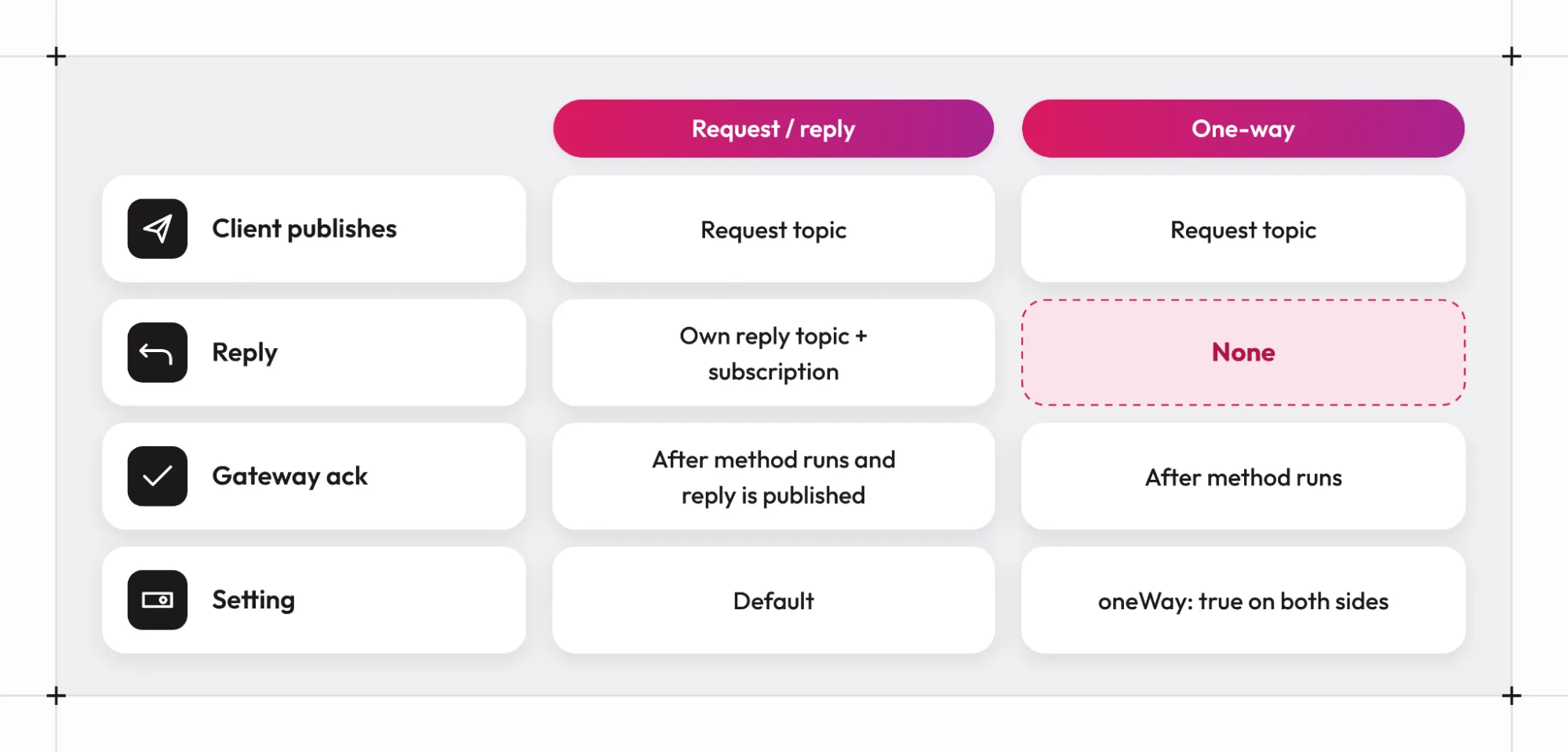
Request/reply works as follows. In the orchestrator and scoring service example from the introduction, the orchestrator is the client and the scoring service is the module hosted by the Gateway. The client publishes the request to requestTopic with two attributes: correlationId, one value per call, and replyTo, the client's reply topic. The Gateway pulls requestSubscription, runs the method, and publishes the response to the replyTo topic with the same correlationId. The client pulls its replySubscription until a message with that identifier arrives or rpcTimeoutMs elapses. Because the Gateway reads the reply address from each request, its own configuration needs no reply topic.
Configuration for the Gateway and the Client
The Gateway side uses a plugin config file. Install the Gateway from a terminal (on Windows, iwr https://grft.dev/get | iex; on Linux and macOS, curl -fsSL https://grft.dev/get | sh), as a Docker image, or as a binary from the Gateway releases page. The plugin library comes from the extensions releases page, and gg looks for it next to the config file first, then in its working directory. Use a plugin and a Gateway of matching versions, because plugin v1.2.0 introduced a new transport C ABI, so a plugin and a Gateway from different generations may not load together. On Windows, put gg.exe, the hosted module, and PubSubPlugin.dll in one folder, then start the Gateway with --config. The Readme's emulator example uses the following file:
{"name": "PubSubPlugin","projectId": "graftcode-local","emulatorHost": "localhost:8085","requestTopic": "graft-requests","ackDeadlineSeconds": 60,"autoCreate": true,"verifySsl": false}
.\gg.exe netapp.dll --config pubsubplugin.json
The generated package can then be installed from the Graftcode Vision page, served at /GV on the Gateway (the Readme shows http://localhost:81/GV; check the Gateway log for the actual port on your version). On Linux and macOS the name value is libPubSubPlugin.
The client side is documented for C# with the Hypertube SDK. The client configuration has no runtime or host keys, because the plugin carries the transport, and each client process needs its own replyTopic:
{"configurations": {"graft.nuget.netapp": {"plugin": {"name": "PubSubPlugin","projectId": "graftcode-local","emulatorHost": "localhost:8085","requestTopic": "graft-requests","replyTopic": "graft-replies","rpcTimeoutMs": 30000,"ackDeadlineSeconds": 60,"autoCreate": true,"verifySsl": false}}}}using Hypertube.Netcore.Sdk;using Hypertube.Netcore.Sdk.Configuration;RuntimeBridge.AddConfig(ConfigPriority.User, configJsonOrPathToFile);var rtmCtx = RuntimeBridge.InitializeRC("graft.nuget.netapp");var result = rtmCtx.GetType("netapp.Calculator").CreateInstance().InvokeInstanceMethod("Add", 1, 2).Execute().GetValue();
AddConfig accepts a JSON string, a path to a JSON file, or the name of an environment variable that holds either. The key under configurations has to match the name passed to InitializeRC, and only one plugin config should be loaded per process.
The settings below cover the fields most deployments touch. Defaults come from the Readme and match the values in the plugin's source.
| Field | Required | Default | Purpose |
|---|---|---|---|
name | yes | none | PubSubPlugin on Windows, libPubSubPlugin on Linux and macOS |
projectId | yes | none | Google Cloud project id; the emulator accepts any value |
requestTopic | yes | none | Topic the client publishes requests to (alias queue) |
requestSubscription | gateway | <requestTopic>-sub | Subscription the Gateway pulls (alias subscription) |
replyTopic | RPC client | none | This process's reply topic (alias replyQueue) |
replySubscription | RPC client | <replyTopic>-sub | Subscription on the reply topic; one per client process |
rpcTimeoutMs | no | 30000 | How long the client waits for a reply; maximum 3,600,000 |
ackDeadlineSeconds | no | 60 | Acknowledgment deadline, 10 to 600; set above the longest call |
maxMessages | no | 10 | Client pull batch size, 1 to 100 |
oneWay | no | false | Skip the reply; set on both sides |
autoCreate | no | true with an emulator host, otherwise false | Create missing topics and subscriptions |
Topic and subscription ids are 3 to 255 characters long, start with a letter, and use only letters, digits, -, _, and .. Settings can be written as a flat object, as above, or nested under a pubsub object.
What Happens When a Call Fails or Times Out
The plugin's source shows how failures travel, and the behavior differs from what the broker alone would suggest. In the server loop, the Gateway pulls one message per request and finishes handling it before it pulls the next, so a single Gateway process works through requests in sequence. It acknowledges a request only after the method has run and, for request/reply, after the response has been published. If processing throws, returns false, or the reply cannot be published, the request stays unacknowledged and Pub/Sub redelivers it after the acknowledgment deadline.
A request in request/reply mode that lacks correlationId or a valid replyTo is also left unacknowledged, with a warning in the Gateway log. A dead-letter policy on the request subscription is the way to stop such a message from being retried forever, and the plugin does not change that policy. Because redelivery can happen after the caller has given up, the client treats unmatched replies carefully: it acknowledges every reply it pulls, including ones whose correlation identifier it no longer waits for, so a timed-out call does not leave the reply subscription filling up.
On the caller's side, the client code retries a publish that fails with HTTP 404 for up to five seconds, which absorbs the short gap while a topic is created. A permission or not-found error while pulling the reply subscription fails the waiting calls with the HTTP error text, instead of leaving them to wait out the timeout. In the transport layer, a response whose first byte is 255 is thrown on the caller as an exception that carries the rest of the bytes as its message. That is the plugin's signal for an error reply, and it arrives as a plain exception, not as a type defined by the service.
One-Way Calls for Events That Need No Answer
Some calls have no useful return value, such as writing an audit record or kicking off a background job. Setting "oneWay": true on both the client and the Gateway turns the plugin into a fire-and-forget channel. The client omits replyTo and does not wait. The Gateway runs the method, acknowledges the request, and publishes nothing back. A reply topic is not required, and a one-way client needs only requestTopic. The Readme's one-way client example is the request/reply example without replyTopic and rpcTimeoutMs, with oneWay added.
{"name": "PubSubPlugin","projectId": "graftcode-local","emulatorHost": "localhost:8085","requestTopic": "graft-requests","oneWay": true,"autoCreate": true,"verifySsl": false}
One-way mode keeps the delivery properties described earlier. The request is still delivered at least once, so a duplicate execution is possible and the handler has to tolerate it. The oneWay setting has to match on the client and the Gateway, and only one plugin config is allowed per process, so each mode needs its own request topic and its own Gateway. A request/reply Gateway leaves one-way requests unacknowledged, so Pub/Sub redelivers them until they reach a dead-letter topic or expire. With configuration covered, the next step is running the whole arrangement on a laptop before it touches Google Cloud.
[7]Local Development with the Pub/Sub Emulator and the Sample Setup
Google ships a Pub/Sub emulator, and its documentation describes starting it with gcloud beta emulators pubsub start, the PUBSUB_EMULATOR_HOST variable that points client libraries at it, and the fact that the project id does not need to belong to a real project. The same page lists limits to keep in mind: IAM operations are not supported, configurable message retention is not supported, and subscriptions never expire. Behavior around permissions and expiry therefore needs a test against a real project before launch.
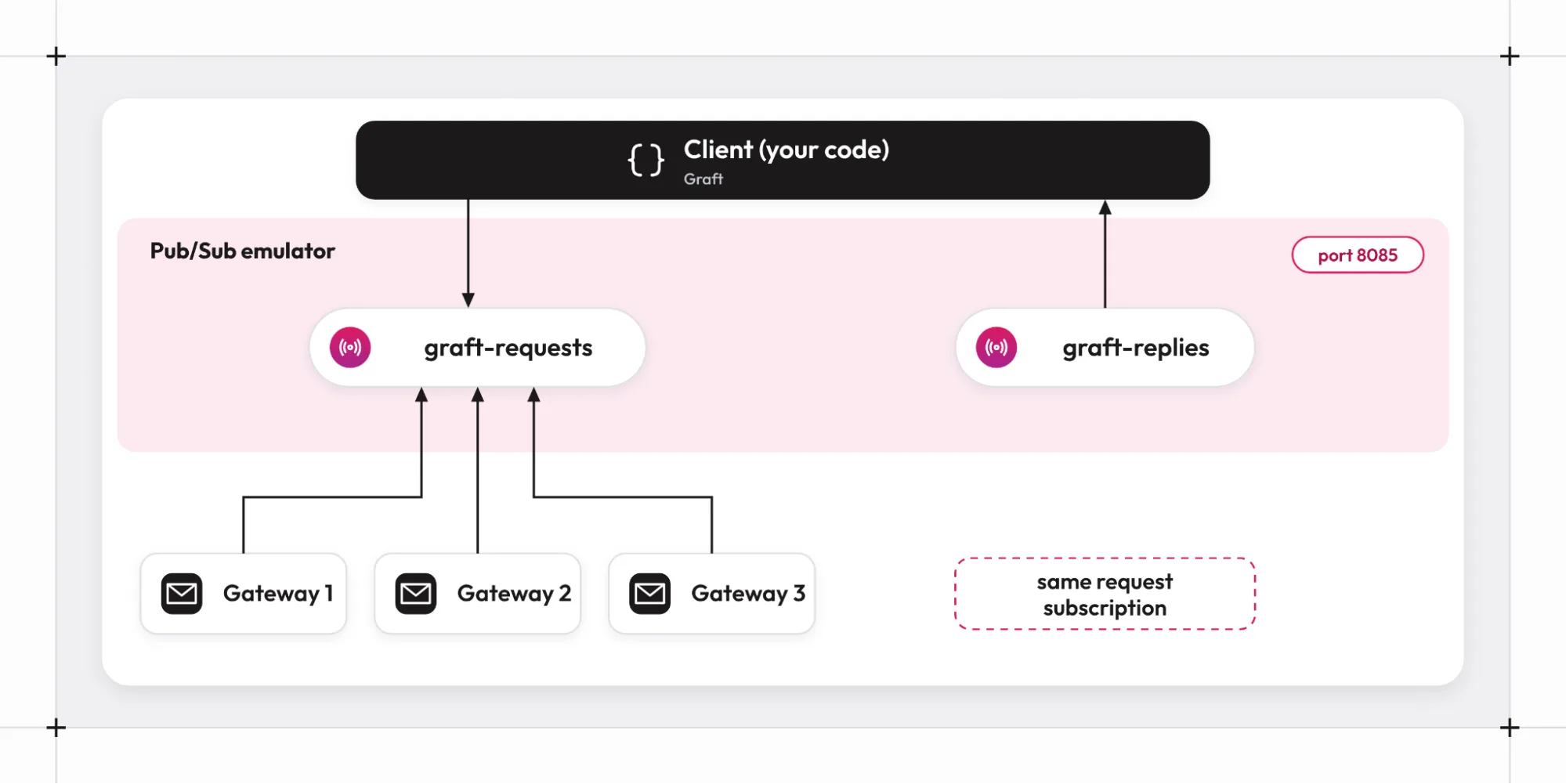
The plugin treats the emulator and production as one code path. The Readme says the emulator listens on localhost:8085, that PUBSUB_EMULATOR_HOST fills in emulatorHost when it is empty, and that no credentials are sent to the emulator. The emulator does not create topics, so the sample configurations set autoCreate to true, and the plugin creates graft-requests, graft-requests-sub, graft-replies, and graft-replies-sub in the project graftcode-local when the Gateway and the client start.
For a ready-made environment, the communication-plugin-samples/pubsub folder in the graftcode-extensions repository holds the emulator, a Gateway hosting a sample module, and the plugin configuration. The sample's run script builds and starts the stack with Docker Compose. It starts three Gateway servers that compete for the same request subscription, which fits how capacity grows: a single Gateway handles one request at a time, and adding Gateway processes on the same subscription adds capacity.
[8]Credentials, IAM Roles, and Production Settings Checklist for Google Cloud
On Google Cloud, the configuration drops emulatorHost and verifySsl and supplies credentials in one of three ways. The plugin accepts an accessToken (or the PUBSUB_ACCESS_TOKEN variable), a credentialsFile pointing at a service-account JSON key (or GOOGLE_APPLICATION_CREDENTIALS), or the Compute Engine metadata server when neither is set, which suits workloads on Google Cloud that run under an attached service account. A bearer token wins over a key file when both are present.
Permissions follow the roles each side plays. The Gateway needs pubsub.subscriptions.consume on the request subscription and pubsub.topics.publish on reply topics. A client needs pubsub.topics.publish on the request topic and pubsub.subscriptions.consume on its reply subscription. Google's access control page maps these permissions to predefined roles: Pub/Sub Publisher holds pubsub.topics.publish, Pub/Sub Subscriber holds pubsub.subscriptions.consume, and creating topics or subscriptions needs the Pub/Sub Editor role or an equivalent custom role. Since autoCreate creates resources, that last requirement is a reason to turn it off in production.
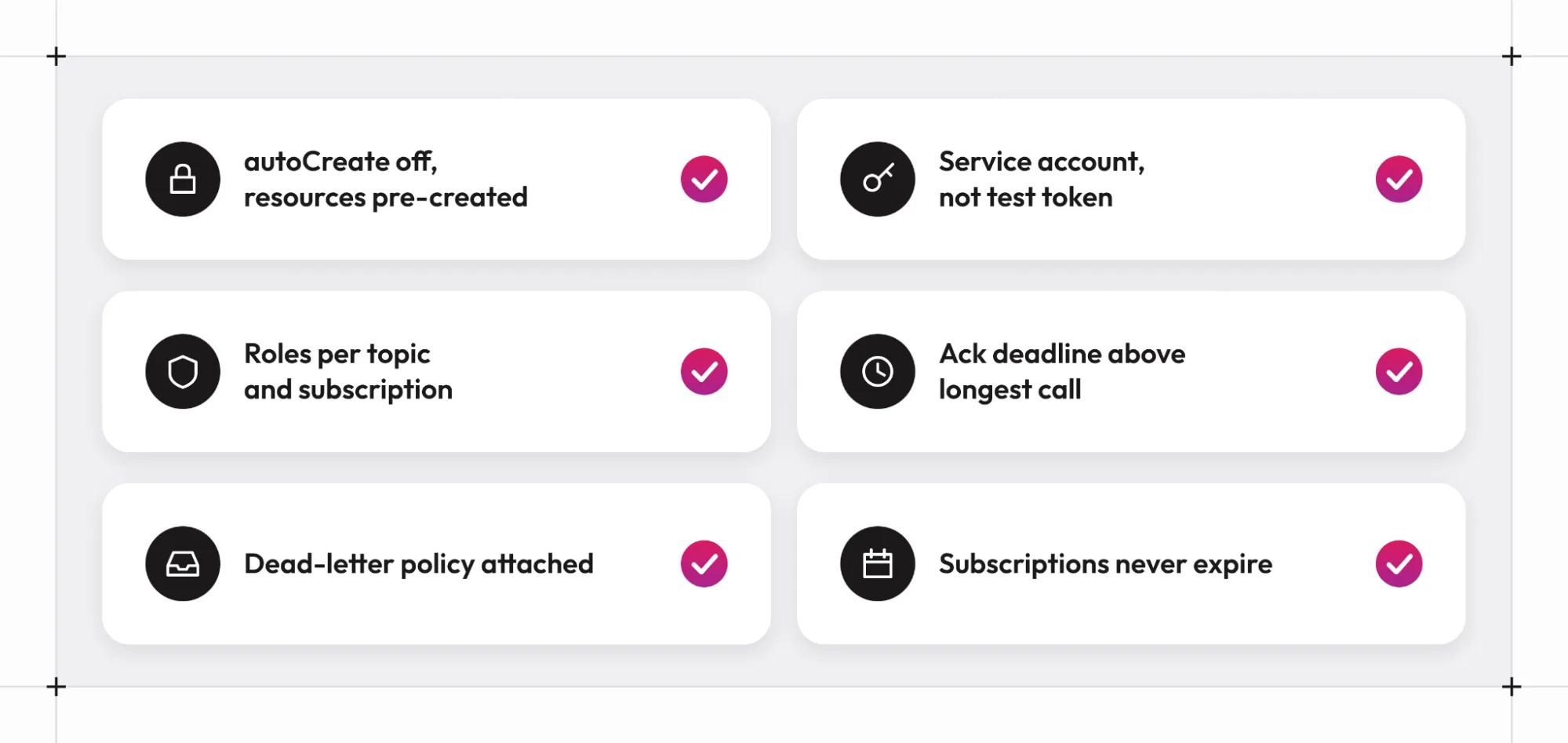
A short checklist covers the rest of the production changes:
- Set
autoCreateto false and create topics, subscriptions, and the dead-letter topic ahead of time, so the runtime identity does not need administrative rights. - Remove
emulatorHostandverifySslfrom every production config. - Set
ackDeadlineSecondsabove the longest call, and remember that the value in the plugin config applies when the plugin creates a subscription, while a subscription created in advance keeps the deadline it was created with. - Attach a dead-letter policy to the request subscription, and grant Pub/Sub's service account the roles it needs on the dead-letter topic.
- Set the expiration policy of request and reply subscriptions to never expire for services that can sit idle for weeks, since the plugin's create call sets only the name, topic, and deadline, which leaves Google's defaults in place for everything else.
- Grant the Gateway publish rights on every client's reply topic, through a project-level role or through per-topic grants that deployment tooling creates together with each client.
[9]Where Should You Start with Pub/Sub and Graftcode
Pub/Sub carries request/reply once three things are in place: a correlation identifier on every request, a reply topic and subscription for each caller that exist before the first publish, and consumers that tolerate a message arriving twice. The acknowledgment deadline, the dead-letter policy, and the retention and expiration periods decide how that arrangement behaves under failure, and a deadline shorter than the slowest call is the setting most likely to cause surprises. The Graftcode plugin keeps all of this on Google's side and reduces the code a team writes to use it, since the Graft call, the attributes, the reply routing, and the polling are handled by the plugin.
The quickest way to evaluate the plugin is the emulator sample: run the communication-plugin-samples/pubsub stack, install the generated package from Graftcode Vision, and make a request/reply call from a .NET client. From there, move the configuration to a real project with autoCreate off, the roles above, and a dead-letter policy attached. The Graftcode Academy covers Graft installation and Gateway setup in detail, and the plugin Readme holds the full configuration reference.
[10]FAQ
Does the plugin use the Google Cloud client libraries or streaming pull?
No. The plugin calls the Pub/Sub JSON REST API directly with libcurl, using the publish, pull, and acknowledge methods plus topic and subscription creation. Pulls use the unary REST method, which returns immediately when a subscription is empty, so the client polls until its reply arrives or rpcTimeoutMs elapses. The Readme gives the size of the gRPC-based google-cloud-cpp build as the reason for this design.
Can several client processes share one reply topic and subscription?
No. Each client process needs its own reply topic and its own reply subscription. Subscribers that read from one subscription share its messages, so a reply meant for one process could be delivered to another, which would not match the correlation identifier. The Gateway reads the reply address from the replyTo attribute on each request, so it supports any number of clients without extra configuration.
What happens if a call takes longer than the acknowledgment deadline?
Pub/Sub redelivers the request when the deadline passes without an acknowledgment, and the method can run a second time while the first run is still in progress. The plugin sets the deadline when it creates a subscription and does not extend it during a call, so ackDeadlineSeconds should be above the longest expected call, and the method should be idempotent. If the first run still publishes a reply after the caller has timed out, the client acknowledges and discards that unmatched reply the next time it pulls its reply subscription.
Does the plugin support Pub/Sub exactly-once delivery or ordering keys?
The Readme does not mention either feature. It describes the plugin as at-least-once and advises making called operations idempotent, and that is the safe assumption for design. Check with Graftcode before relying on exactly-once delivery or message ordering for a production workload.
I don't see a plugin for my language. What should I do?
Please reach out to the Graftcode team, and we will be happy to build one.
/WRITTEN BY